A customer signing up for a new account expects verification to take seconds. When an SMS OTP arrives several minutes late – or does not arrive at all – a simple sign-up can quickly become a frustrating experience.
OTP verification in Singapore remains a widely used way to authenticate users, particularly for fintech, e-commerce and digital services. A one-time password (OTP) sent by SMS is familiar, works across a broad range of mobile devices and does not require users to install another app. But SMS delivery is not always predictable. Network conditions, carrier filtering, incorrect phone numbers and traffic congestion can all affect whether an OTP reaches the user in time.
Silent Mobile Authentication offers a different approach. Instead of asking users to receive and enter a one-time password, it can verify a mobile number through the mobile network, removing a manual step from the authentication journey.
Neither approach is right for every situation. SMS OTP can be a practical choice for two-factor authentication in Singapore when broad accessibility and a familiar verification experience matter, while Silent Mobile Authentication can reduce friction for eligible users by removing OTP entry altogether.
The right approach depends on factors such as your authentication flow, security requirements, mobile coverage, eligible users and how much friction you want to introduce at sign-up or login.
What Is an OTP and How Is It Delivered?
An OTP is a temporary verification code generated for a specific authentication attempt. It is typically valid for a limited period and is intended to be used only once.
When a customer logs in or signs up for an account, they may be asked to enter a one-time password (OTP) to confirm that they have access to the registered mobile number.
SMS OTP is commonly used as part of two-factor authentication (2FA) – a standard security layer for Singapore businesses across banking, e-commerce and healthcare.
An SMS OTP flow generally works like this:
- The customer enters their mobile number during registration, login or another verification step.
- The business requests an OTP through its authentication or verification service.
- A temporary code is generated for that specific authentication attempt.
- The OTP is sent by SMS to the customer’s mobile number.
- The customer enters the code into the application.
- The business verifies the submitted code against the OTP generated for that attempt.
- The customer is authenticated if the code is valid, has not expired and has not already been used.
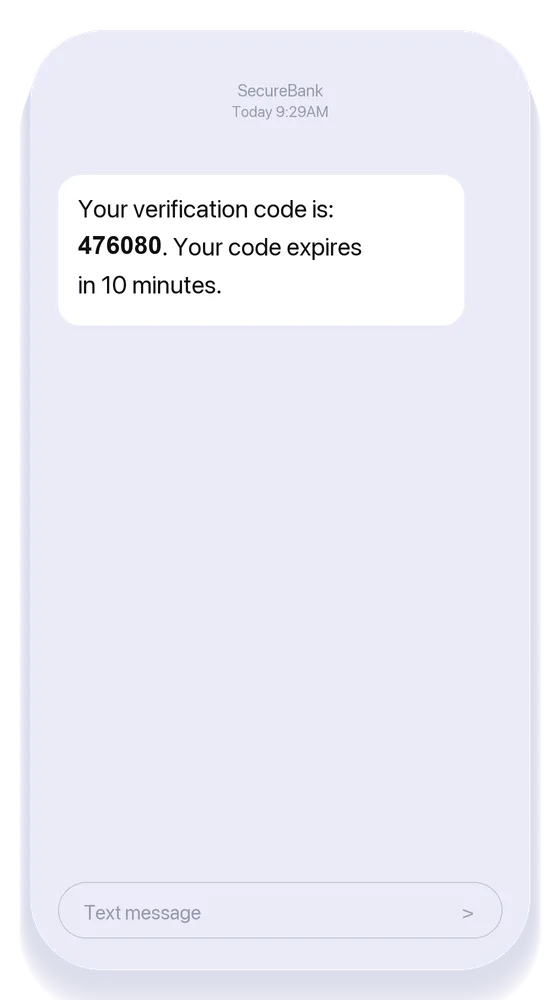
For example, a Singapore fintech platform might ask a customer to verify their mobile number before completing account registration. The customer receives a six-digit code by SMS, enters it into the application and continues once the code has been validated.
The important distinction is simple: SMS is the delivery channel; the OTP is the temporary credential used for verification. This means that even when the authentication logic works as intended, the customer experience can still depend on how reliably that SMS reaches their phone.
Why Do SMS OTPs Fail or Get Delayed?
An SMS one-time password (OTP) can fail or arrive late for several reasons, and not every delivery problem originates from the business’s application or SMS provider.
The customer may have entered an incorrect number. The mobile network may be congested. A carrier may filter the message, or an OTP may arrive after its verification window has expired.
Common OTP failure causes include:
- Incorrect or inactive phone numbers: The customer may have entered the wrong number, or the number may no longer be active.
- Mobile network conditions: Network congestion or temporary connectivity issues can delay delivery.
- Carrier filtering: Mobile operators may filter certain messages based on traffic characteristics, content or other factors.
- International routing: Messages sent across borders may encounter additional routing or delivery considerations.
- Traffic spikes: Sudden increases in authentication requests can create higher messaging volumes and affect delivery.
- Sender configuration: Incorrect or unsupported sender information can prevent messages from being delivered as expected.
- Expired OTPs: The message may reach the customer after the verification window has closed, making the code unusable.
- Repeated requests: Customers who request multiple OTPs may receive several codes, creating confusion over which one is still valid.
- Device or handset issues: Limited connectivity, a full SMS inbox or other device-level problems can prevent the customer from receiving the message.
This means “OTP not received” does not necessarily mean “SMS failed.” A message can encounter problems at different points between the authentication system and your customer’s handset.
Delivery performance also depends on the messaging infrastructure behind your OTP workflow. 8×8 SMS and OTP verification provides SMS capabilities with intelligent routing and delivery reporting, giving your business greater visibility into message delivery and helping you identify failures or delays within the messaging journey.
How Can Singapore Businesses Improve SMS OTP Delivery?
Improving SMS OTP delivery starts with looking at the entire verification journey, not simply sending the same SMS again when a customer does not receive a code.
For Singapore businesses, a reliable OTP experience means getting the code to the customer quickly, giving your teams visibility when something goes wrong, and making it easy for customers to recover when delivery fails.
Here are five ways you can improve your SMS OTP workflow:
1. Use reliable SMS delivery infrastructure
Your authentication flow is only as effective as your ability to deliver the OTP. If the message is delayed or fails to reach the customer, even a well-designed verification process can break down.
When choosing an SMS provider, look at how messages are routed to Singapore mobile networks, how delivery failures are handled, and what visibility you get into the delivery process.
2. Monitor delivery status
When a customer says they did not receive an OTP, you need to know what happened after the message was sent.
Delivery receipts and messaging analytics can help you distinguish between messages that were delivered, delayed, rejected, or otherwise unsuccessful. This gives your technical teams a clearer view of recurring delivery issues, rather than relying solely on customer complaints.
3. Set sensible OTP expiry periods
An OTP should remain valid long enough for a customer to receive and enter it, but not so long that an unused code remains valid unnecessarily.
Consider your typical SMS delivery time when setting the expiry window. If customers regularly receive codes after they have expired, you may need to review both your OTP configuration and your SMS delivery performance.
4. Prevent unnecessary OTP requests
Repeatedly tapping “Send OTP” can create its own problems. A customer may receive several codes and be unsure which one is valid, while your system has to process multiple authentication requests.
Resend timers, rate limits and clear messages such as “A new code has been sent” can make the experience more predictable. You can also make it clear when a previous code has been invalidated, so customers know which OTP to use.
5. Provide an appropriate fallback
Even with reliable SMS delivery, there will be situations where an OTP does not reach the customer as expected.
Depending on your security requirements and authentication flow, you can provide an alternative verification method. This could include another messaging channel, voice verification or a different authentication approach.
The key is to avoid treating SMS OTP as the only possible path through your verification journey. If a customer cannot receive the code, you should have a secure way to help them continue without simply asking them to keep requesting another OTP.
What Is Silent Mobile Authentication?
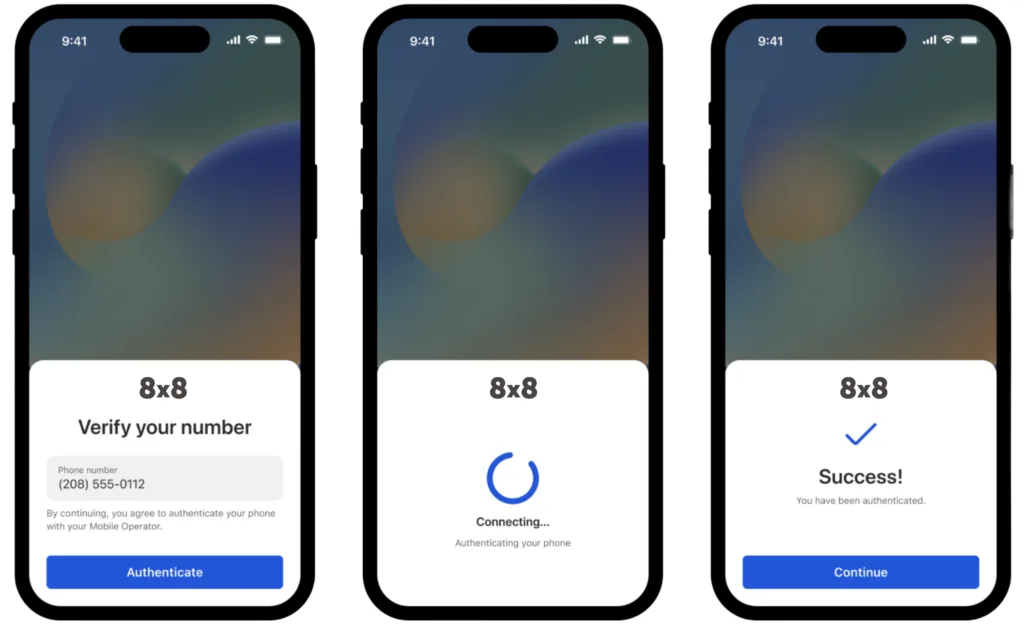
Silent Mobile Authentication is a mobile-number verification method that verifies a user’s mobile identity through the mobile network without requiring them to receive and enter an SMS OTP.
Imagine a customer signing up for an account and reaching the verification step. Instead of waiting for an SMS, finding a six-digit code and typing it into the app, the customer can be verified without manually entering an OTP.
The difference is in what the customer needs to do. With traditional SMS OTP verification, the customer receives a code and enters it into the application. With Silent Mobile Authentication, the verification process can check the user’s mobile number through the network and return the verification result to the application.
This can support two-factor authentication by adding mobile-number verification without introducing another manual step into the customer journey.
A simplified flow looks like this:
User enters mobile number → Authentication request → Mobile network verification → Verification result → User continues
For the customer, the experience can feel almost invisible: there is no code to copy, no SMS to wait for and no additional verification field to complete.
The exact implementation depends on factors such as the authentication provider, mobile network environment, user device and network conditions. Silent Mobile Authentication is therefore not a universal replacement for SMS OTP, but another option you can consider when reducing authentication friction is a priority.
How Does Silent Mobile Authentication Work?
Silent Mobile Authentication verifies a user’s mobile identity through information associated with their mobile connection, without requiring them to manually receive and enter an OTP.
This means the customer may not need to:
- Wait for an SMS
- Read a verification code
- Copy the code
- Switch between applications
- Manually enter a one-time password (OTP)
For the customer, fewer steps can mean a faster and more seamless authentication experience. This can be particularly useful for mobile-first applications where reducing friction at sign-up or login is important.
For example, imagine a returning customer logging into a Singapore digital service. With SMS OTP verification, they may need to wait for an SMS, find the code and enter it before continuing. With Silent Mobile Authentication, the application can verify the customer’s mobile identity through the network, where supported, without requiring those manual steps.
The experience changes from:
Receive OTP → Read code → Enter code → Continue
to:
Mobile verification → Verification result → Continue
For businesses looking to reduce reliance on manually entered OTPs, 8×8 CPaaS also supports Silent Mobile Authentication, helping you verify a user’s mobile identity through the mobile network without requiring them to manually enter a code. This can be useful when you want to reduce friction while keeping mobile-number verification as part of the authentication journey.
SMS OTP vs Silent Mobile Authentication: Key Differences
| SMS OTP | Silent Mobile Authentication | |
| How the user is verified | User receives and enters a temporary code | Mobile identity is verified through the mobile network |
| Manual code entry | Required | Typically not required |
| SMS dependency | Yes | Designed to reduce reliance on OTP SMS |
| User experience | Familiar but involves additional steps | Lower-friction authentication experience |
| Delivery delays | Can affect authentication | Can reduce dependence on SMS delivery |
| Device/network requirements | Mobile number must receive SMS | Availability depends on supported mobile/network conditions |
| Best suited to | Broadly supported verification flows | Mobile-first, low-friction authentication |
| Fallback options | Can be used as a fallback itself | May require another authentication method when unavailable |
| Role in authentication | Commonly used for two-factor authentication | Can support two-factor authentication without manual OTP entry |
A business can use silent mobile authentication as a primary verification method where appropriate, with SMS OTP available as a fallback when silent verification is unavailable or unsuccessful.
Is Silent Mobile Authentication More Secure Than SMS OTP?
Security depends on how the authentication method is implemented, the overall architecture and the risks you need to manage. Singapore businesses should therefore avoid treating one method as automatically more secure than the other.
With SMS OTP, the customer receives a temporary code and enters it into the application. This is a familiar and widely used authentication flow, but it also introduces an additional step where the code needs to be delivered, received and entered correctly.
Silent Mobile Authentication removes the need for manual OTP entry. This can reduce some of the friction and risks associated with handling SMS verification codes, while allowing the application to verify the customer’s mobile identity through the mobile network where supported.
That does not mean Silent Mobile Authentication eliminates every authentication risk. Your overall security still depends on the controls around the device, mobile network, user account and application, as well as how the authentication method is implemented.
For higher-risk applications, the better approach is to treat authentication as part of a broader identity and access management strategy, rather than relying on a single verification method.
The question is therefore not simply “Which method is more secure?” It is “Which authentication approach provides the right balance of security, accessibility and customer friction for your use case?”
Should Businesses Replace SMS OTP With Silent Mobile Authentication?
Not necessarily. In fact, the better approach may be to use the two methods together.
| Authentication requirement | Recommended approach |
| Broadly supported mobile verification | SMS OTP |
| Familiar, manual verification | SMS OTP |
| Reduce manual code entry | Silent Mobile Authentication |
| Reduce dependence on SMS delivery | Silent Mobile Authentication |
| Mobile-first authentication experience | Silent Mobile Authentication |
| Supported users unable to complete silent verification | SMS OTP fallback |
| Multiple authentication scenarios | Combine methods based on risk and availability |
When Should a Singapore Business Consider Silent Mobile Authentication?
Silent mobile authentication may be worth considering when:
- You want a faster verification experience without asking customers to wait for and enter an SMS OTP.
- Your customers primarily use mobile applications, where background verification can fit naturally into the user journey.
- OTP delivery delays are affecting the customer experience and creating drop-offs during sign-up or login.
- You want to reduce manual code entry, particularly across mobile-first authentication journeys.
- Customers authenticate frequently, making repeated OTP entry frustrating over time.
- You want to streamline mobile-number verification without removing it from the authentication process.
The strongest use case is often friction reduction.
A customer verifying their number once may not mind entering an OTP. But if authentication happens frequently, such as when logging in, recovering an account or confirming a transaction, removing unnecessary manual steps can make the experience significantly smoother.
How Can 8×8 CPaaS Support Silent Mobile Authentication for SMS Verification?
8×8 CPaaS can help businesses reduce authentication friction while strengthening mobile identity verification across key customer journeys.
Core capabilities of the Silent Mobile Authentication service include:
- Frictionless sign-up: Streamline registration by verifying a user’s mobile identity in the background, reducing lengthy forms and manual verification steps.
- Seamless login authentication: Enable faster account access with fewer manual steps, helping improve the user experience while adding another layer of identity verification.
- Secure transaction processing: Support mobile identity verification for sensitive actions such as purchases and fund transfers, helping businesses strengthen protection against fraud and unauthorised access.
- Simplified account recovery: Let users verify their identity through their mobile device and regain account access without lengthy recovery processes.
- Multi-Factor Authentication (MFA): Incorporate Silent Mobile Authentication into a broader MFA strategy to add another layer of security without requiring users to manually enter an OTP.
8×8 CPaaS’ Verification API helps businesses confirm user identities using verification codes delivered via SMS, voice or email, helping strengthen authentication and reduce the risk of unauthorised access.
For businesses using modern identity frameworks, 8×8 CPaaS also integrates with Descope, allowing Silent Mobile Authentication to be incorporated into CIAM and passwordless authentication journeys.
Talk to our experts to see how 8×8 CPaaS can help you reduce OTP delivery failures, cut carrier-related drop-offs, and recover the sign-ups you’re currently losing to unreliable SMS.
Frequently Asked Questions
- Why is my SMS OTP not arriving? An SMS OTP may be delayed or fail because of incorrect phone numbers, network conditions, carrier filtering, international routing, traffic spikes, sender configuration or device-related issues. Businesses should use delivery reporting to determine whether the message was delivered, delayed or rejected.
- Can businesses use SMS OTP and silent mobile authentication together? Yes. Businesses can use silent mobile authentication where supported and offer SMS OTP as a fallback when silent verification cannot be completed. Combining methods can help balance user experience, availability and authentication requirements.
- When should a business use SMS OTP? SMS OTP can be appropriate when businesses need a familiar and broadly supported mobile verification method, including registration, login and account recovery. It can also serve as a fallback when other authentication methods are unavailable.
- When should a business consider silent mobile authentication? Businesses may consider silent mobile authentication when they want to reduce manual OTP entry, improve mobile authentication experiences or reduce dependence on SMS delivery. It can be particularly relevant for mobile-first applications with frequent authentication requirements.
- How can businesses improve SMS OTP delivery? Businesses can improve the reliability of SMS OTP workflows by using appropriate messaging infrastructure, monitoring delivery status, setting sensible OTP expiry periods, limiting repeated requests and providing suitable fallback options. Testing the complete authentication journey can also help identify failures before they affect customers.