A support agent is halfway through a WhatsApp chat when the problem turns messy. A refund, a wrong charge, three screenshots stacking up.
A quick call would settle it in two minutes. So the agent taps to call the customer back, and nothing happens.
That’s the moment most teams meet the rules behind a WhatsApp business call. Customers can call you freely. Calling them back works differently.
Voice still matters, too. McKinsey’s 2024 customer care survey found that 71% of Gen Z customers rate a live phone call the quickest way to settle a service issue.
The Two Ways a WhatsApp Business Call Starts
Every WhatsApp business call is one of two types, and which type it is decides whether you need the customer’s permission before you dial.
In a user-initiated call (UIC), the customer starts things, tapping to call your business from your profile or an open chat. No permission needed, and the call is free for your business, which makes it the simpler of the two calling paths to set up.
In a business-initiated call (BIC), you place the outbound call. Both types run on the WhatsApp Business API, the same channel that carries your messages.
One detail catches teams out. A user-initiated call does not give you the right to call back, and neither does an open chat thread.
The distinction shapes everything that follows: consent, cost, and even where the feature works at all.
Read more: WhatsApp Business Calling: Voice Meets Chat for Service
Why Consent Drives a WhatsApp Business Call
WhatsApp built its platform around user control, and calling is no exception.
Meta’s guidance is blunt. Once you enable calling, people can call your business, and they can give you permission to call them.
Consent is not a compliance box. It gates your access to the channel, and WhatsApp reads how customers respond as the signal that keeps that access open.
Ask at the right moment, and you learn something useful: who actually wants a call, before an agent spends time placing one.
A customer who taps allow has already signaled high intent. They want the problem solved now, which is why capturing that opt-in at the right moment is worth the effort.
Take a bank like BDO or BPI confirming a suspicious transaction. A consented call lands as a trusted touch, not a robocall the customer ignores.
The reverse is just as mechanical. Meta’s calling documentation sets out how two consecutive unanswered calls prompt a customer to reconsider an approved permission, and four revoke it automatically.
How a Call Permission Request Works
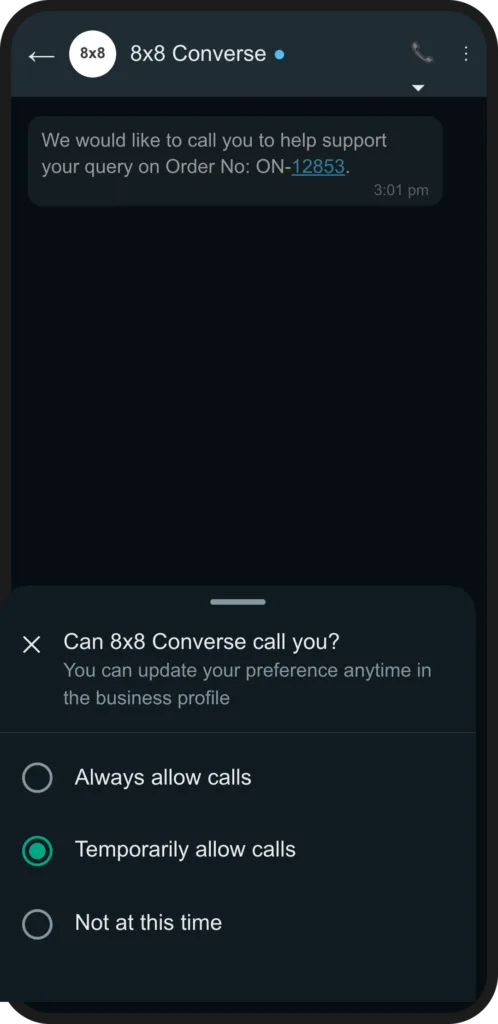
Getting permission follows a short, rate-limited flow, and knowing the limits keeps you from spending your chances on a customer who was never going to answer.
Send the Request
You send a call permission request inside an open conversation, as an interactive message or an approved template.
WhatsApp caps how often you can ask. Meta’s call permission limits allow one request in 24 hours and two within 7 days, per business and customer pair.
Those counters reset once a call connects between you and that customer, so a completed conversation buys the allowance back.
Let the Customer Approve
The customer taps “allow”. Only then can you place the call, and only within the window WhatsApp grants.
You get a webhook when the customer responds, so your system knows whether to dial or hold.
If the customer declines, you wait before asking again, which makes the timing of the request matter.
Call, Then Respect the Limits
After approval, the clock starts. A temporary permission lasts 7 calendar days, while a permanent one holds until the customer revokes it.
Meta caps a business number at 100 connected calls every 24 hours, so treat a granted permission as a budget to spend deliberately.
Matching the Call Type to the Support Moment
Not every issue needs a call, and not every market allows an outbound one. Start by matching the moment to the channel.
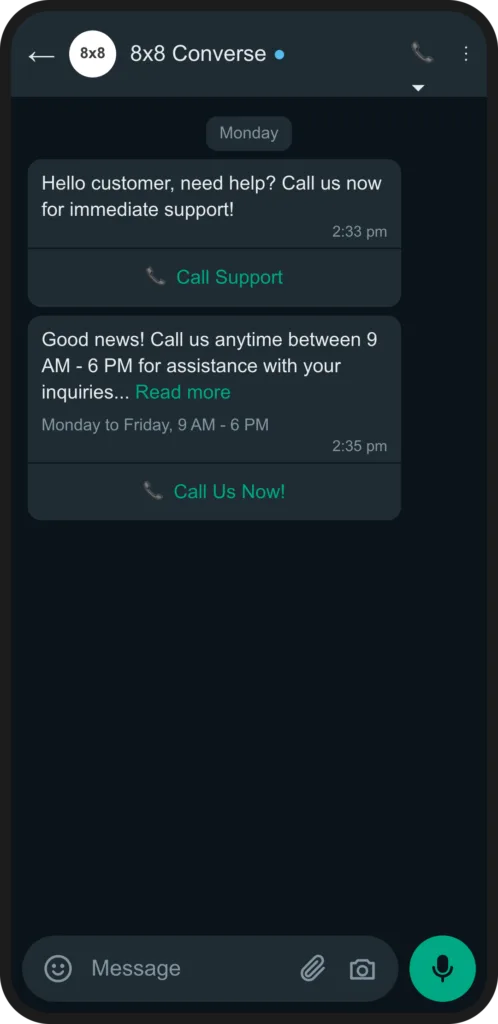
- User-initiated calls: best for customer-driven questions and quick clarifications, available in most regions where the Cloud API runs.
- Business-initiated calls: best for follow-ups you promised, escalations, and sensitive issues, once you hold consent.
- Chat alone: best for simple confirmations, links, and order updates that never need a voice.
A delivery delay from Shopee or Lazada is a good test. A proactive call reassures a high-value customer, while a routine status update is fine as a message.
Business-initiated calling is not available everywhere. Meta’s current availability list names the United States, Canada, Turkey, Egypt, Vietnam, and Nigeria as countries whose business numbers cannot place a BIC.
That list changes, so check it before you commit to BIC in a market, and plan a chat or a standard voice solution fallback for the ones it rules out.
See infographic: WhatsApp Voice Calls for Business – What You Need to Know
Keeping Context From Chat to Call With 8×8 Converse
Getting consent only solves half the problem. If UIC and BIC run in separate systems, the context still gets lost the moment a chat becomes a call.
The hard part of moving from chat to call is not the call, it’s carrying context across. Customers hate repeating themselves, and a channel switch is where that happens.
A unified inbox like 8×8 Converse is built to keep the WhatsApp chat and the voice call in one thread. Both call types are handled in the same place. Customers can dial in, and once permission is granted, an agent can call back from that thread.
The messaging and the calling share the same WhatsApp Business API, so a chat and a follow-up call never split into separate systems. The goal is simple: an agent picks up the call with the conversation in view, instead of asking the customer to start over.
WhatsApp Business Calling is built natively into 8×8 Converse, so an agent takes the call from the same panel that already holds the customer profile, conversation history, and notes.
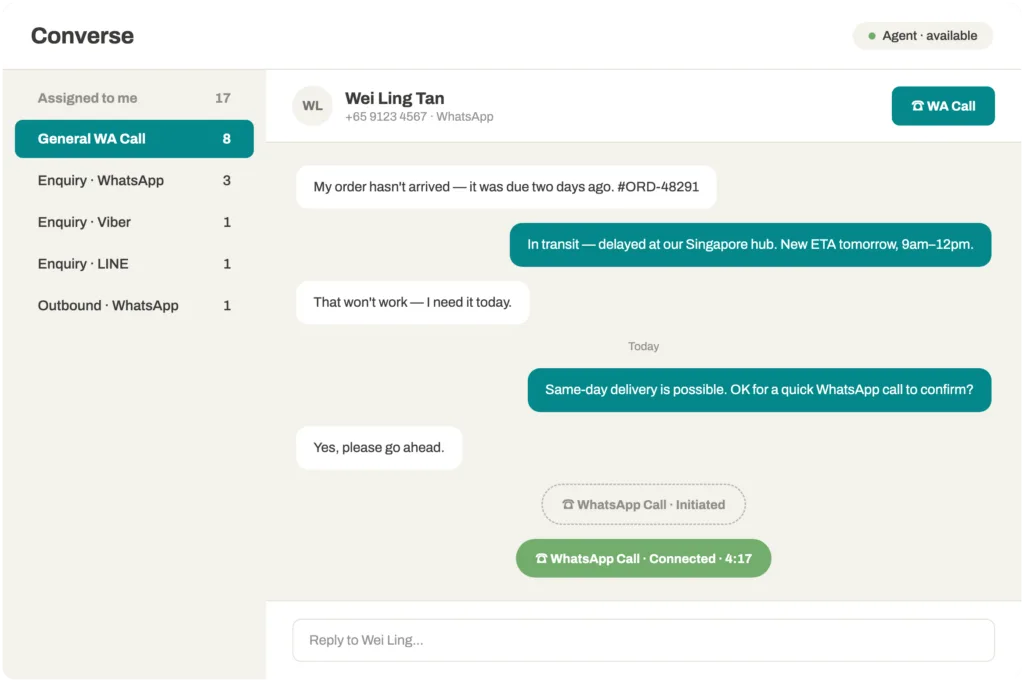
Because the permission request goes out from that same inbox, the consent record stays attached to the conversation, which is what a compliance reviewer asks to see. The voice leg also bridges into existing routing, so calls land in the same queues and agent tools the team already uses.
That makes WhatsApp calling one strand of wider channel orchestration across SMS, WhatsApp, and video, not a channel running on its own.
Getting a WhatsApp Business Call Right
A WhatsApp business call can shorten a hard conversation, but only when the consent flow is right.
Get the permission model, the limits, and the fallbacks in place, and voice becomes a natural next step from chat, not a dead end.
Turn WhatsApp chats into calls without losing the thread with 8×8 Converse. Talk to 8×8 for a walkthrough of BIC and UIC running in one unified inbox.
FAQ – WhatsApp Business Calls
- What is the difference between user-initiated and business-initiated WhatsApp calls? A user-initiated call is one the customer starts, with no permission needed. A business-initiated call is outbound and requires the customer’s consent first.
- Does a customer messaging me mean I can call them? No. An open chat, or even the customer calling you, does not grant permission for a business-initiated call. You must request it separately.
- How often can I ask a customer for call permission? Meta allows one permission request in 24 hours and two within 7 days per customer, and those counters reset once a call connects between you.
- Where is WhatsApp business calling unavailable? Business-initiated calling is blocked when the business number’s country code is in the United States, Canada, Turkey, Egypt, Vietnam, or Nigeria.
- Can customers revoke call permission? Yes. Customers can revoke permission at any time, and four consecutive unanswered calls revoke an approved permission automatically.