
Moving from the WhatsApp Business App to the WhatsApp Business API gives businesses more options for automation, integrations and higher-volume customer messaging. But getting started involves more than simply creating an account.
You first need to choose a Business Solution Provider (BSP), prepare your WhatsApp Business assets, understand how messaging is charged and complete the required onboarding steps.
For most businesses in Australia, setting up the WhatsApp Business API involves choosing a BSP, verifying the business, configuring a WhatsApp Business Account (WABA), registering a phone number, setting up message templates and connecting the API to your existing systems. The exact process and timeline can vary depending on the BSP, business verification requirements, integrations and intended use case.
Whether you’re setting up WhatsApp for customer support, transactional notifications or marketing, understanding these requirements upfront can help you choose the right setup, avoid unnecessary delays and plan for the costs involved.
What is the WhatsApp Business API?
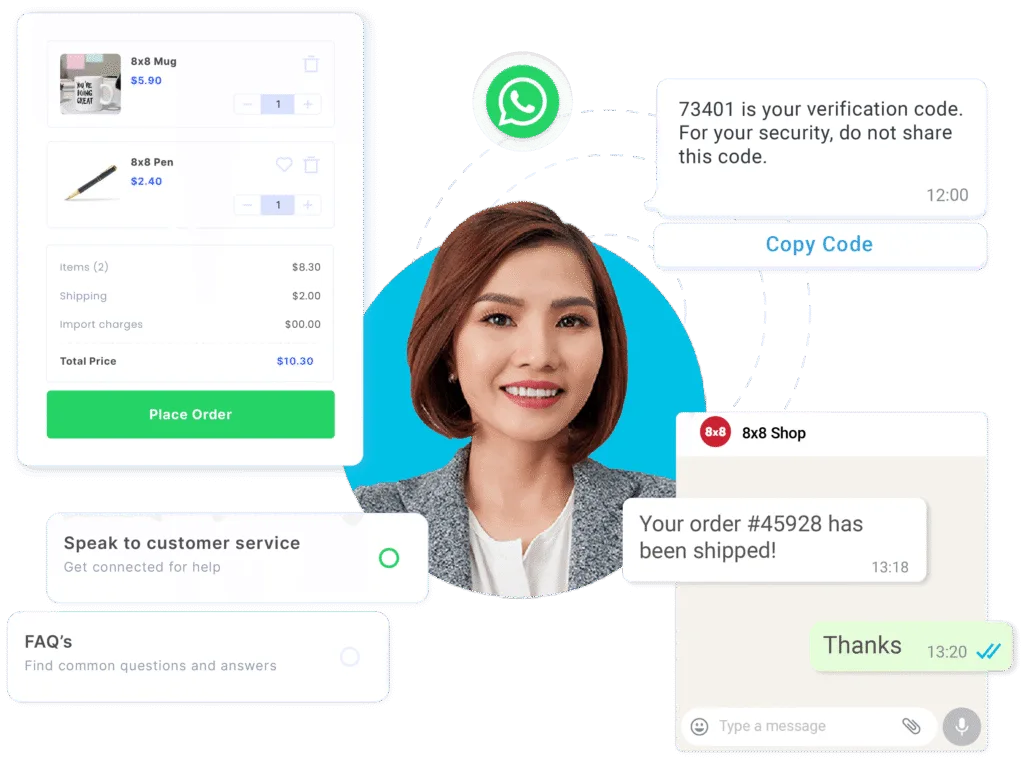
The WhatsApp Business API is Meta’s programmatic interface for businesses that want to send and receive WhatsApp messages through their own systems. It can connect WhatsApp with CRMs, customer-service platforms, e-commerce systems, marketing tools and custom applications, allowing businesses to automate messaging and manage customer interactions at scale.
Unlike the WhatsApp Business App, the API is not a standalone app or inbox that your team opens to manage conversations manually. Instead, it provides the underlying infrastructure that lets your business systems send, receive and process WhatsApp messages.
This makes the API more relevant when you need to:
- Manage conversations across multiple users or teams
- Automate notifications and responses
- Connect WhatsApp with CRM or customer-service systems
- Handle higher messaging volumes
- Build structured customer journeys
- Track messaging and engagement data
- Integrate WhatsApp with other business communication channels
For a small business with a limited team and straightforward messaging needs, the WhatsApp Business App may still be sufficient. The API becomes more useful when you need greater automation, integration, scale or control over how WhatsApp fits into your customer communications.
What is a BSP and How Should I Choose One?
A Business Solution Provider (BSP) is a Meta-approved partner that helps businesses access and use the WhatsApp Business Platform. Depending on the provider, this can include API access, software tools, message template management, integrations, onboarding and technical support.
Working with a BSP means you don’t have to build and maintain the entire WhatsApp integration yourself. The provider can support parts of the setup, API integration, messaging infrastructure and ongoing management, while your business connects WhatsApp to the systems and workflows you already use.
This can be particularly useful if you want to connect WhatsApp with a CRM, helpdesk, marketing platform or custom application without developing the entire messaging infrastructure from scratch.
Read More: No Fluff, Just Results: 10 Best WhatsApp Business Solution Providers (BSPs)
What should you look for in a WhatsApp BSP?
When comparing BSPs, don’t look only at the headline messaging price. Consider what you get with the platform, how easily it fits into your existing systems and what support you’ll have as your messaging needs grow.
| Factor | What to consider |
| API capabilities | Does it support the messaging features and use cases you need? |
| Integrations | Can it connect with your CRM, helpdesk and other business systems? |
| Onboarding | How much assistance is provided with verification and setup? |
| Support | What level of technical and onboarding support is available? |
| Scalability | Can the platform support your expected messaging volume as your needs grow? |
| Analytics | What reporting is available for delivery, engagement and campaign performance? |
| Automation | Can you automate responses, notifications and customer journeys? |
| Multi-channel support | Can WhatsApp be managed alongside SMS, voice or other communication channels? |
| Pricing transparency | Are platform fees, messaging fees and other charges clearly explained? |
| Compliance and security | Does the provider have appropriate security and data-protection practices in place? |
For businesses looking for a WhatsApp BSP in Australia, 8×8 CPaaS provides WhatsApp Business API capabilities alongside SMS, voice and other communication services, giving businesses the option to manage WhatsApp as part of a broader customer communications strategy.
How Do You Set Up the WhatsApp Business API in Australia?
Before beginning your WhatsApp Business API setup, have the following information and resources ready:
- Registered business details
- Appropriate Meta business assets
- A suitable business phone number
- Business profile information
- An understanding of your messaging use cases
- Initial message-template requirements
- CRM or software integration requirements
- Expected messaging volume
- Customer opt-in and consent processes (the linked guide covers Singapore’s PDPA; in Australia, also consider the Privacy Act 1988)
- Technical resources for API integration, where required
It is also useful to map your customer journeys before implementation. For example, determine whether customers will simply receive notifications or whether they need to reply, speak to an agent, complete a form or move into another system.
This helps you choose a BSP and platform configuration based on what you actually need WhatsApp to do, rather than simply choosing the cheapest setup.
A typical WhatsApp API setup follows this process.
1. Choose a BSP
Your choice of Business Solution Provider (BSP) can affect the setup process, available features, pricing, integrations and level of support. Compare providers based on your messaging volume, integrations, support requirements and budget.
If you already use a communications platform for SMS or other channels, check whether it also supports WhatsApp. Using one provider across multiple channels can simplify integration, reporting and ongoing management.
2. Create or connect your Meta business assets
You’ll generally need the relevant Meta business assets and business information required for WhatsApp onboarding.
This may include company details and verification information. Having these ready can help reduce delays during the setup process.
3. Create or connect your WhatsApp Business Account
Your BSP will typically guide you through creating or connecting a WhatsApp Business Account (WABA).
The WABA is used to manage your business’s WhatsApp presence and associated messaging assets, including phone numbers and business profile information.
4. Register your business phone number
You’ll need a phone number to use with the WhatsApp Business API.
Before registering it, check how the number is currently being used. If it is already associated with another WhatsApp setup, additional steps may be required before it can be used for the API.
5. Configure your business profile
Set up the information customers will see when interacting with your business, including your business name and profile details.
Consistent and recognisable branding matters particularly for high-trust use cases such as financial services, utilities and healthcare, where customers need to be confident that a message is coming from the organisation they expect.
6. Set up message templates
You can create WhatsApp message templates for specific customer use cases.
Common examples include:
- Appointment reminders
- Order and delivery updates
- Account notifications
- Booking confirmations
- Payment updates, such as PayID or BPAY confirmations
- Customer-service follow-ups
- Marketing messages
Templates should be built around a clear customer use case and comply with the applicable WhatsApp requirements.
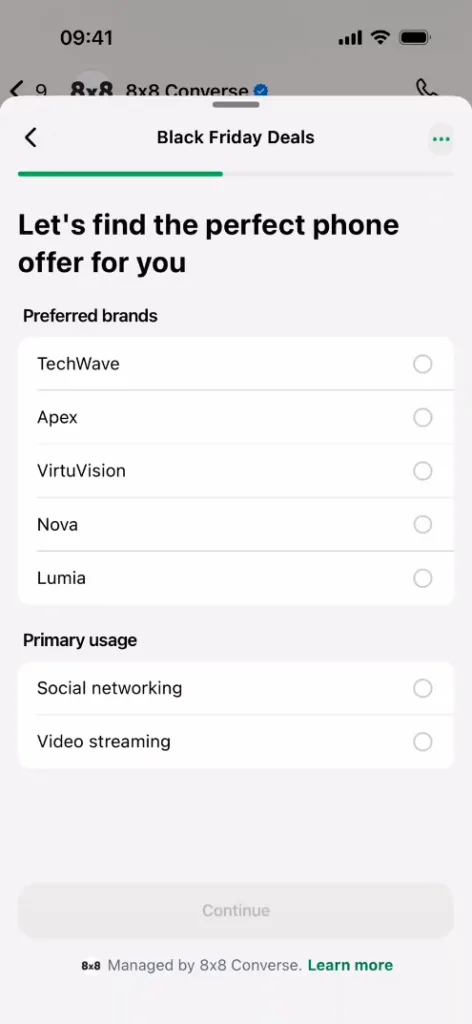
If your use case involves structured, multi-step interactions, such as bookings, lead qualification or order placement, consider WhatsApp Flows at this stage too. Flows let customers complete these actions inside the chat itself, rather than being sent to an external form or website.
7. Connect your systems
Next, connect WhatsApp to the systems that support your customer workflows. Depending on your use case, this could include:
- CRM platforms
- Customer-service and helpdesk software
- Marketing automation platforms
- E-commerce systems
- Booking platforms
- Custom applications
- Data and analytics systems
This allows customer information and messaging workflows to move between WhatsApp and the systems your business already uses, rather than requiring teams to manage each interaction manually.
8. Test and launch
Before going live, test the customer journeys you plan to support. This could include:
- Template delivery
- Customer replies
- Automated responses
- Escalation to human agents
- CRM updates
- Handoffs between different systems
Once the workflow is working as intended, you can begin scaling your WhatsApp communications.
Working with an experienced WhatsApp BSP, such as 8×8 CPaaS, can also provide support with business onboarding, phone-number registration and API configuration.
How Does WhatsApp Business API Pricing Work?
There isn’t one fixed WhatsApp Business API price for every business in Australia. Your costs can depend on how you use WhatsApp, where your customers are located, the applicable WhatsApp pricing model and any additional fees charged by your BSP or platform provider.
The total cost can therefore include more than the underlying WhatsApp messaging charges. Depending on the BSP, you may also need to consider platform fees, software or subscription charges, integration costs and other service fees.
The per-message rates for WhatsApp Business API as of 2026 are listed below (shown in Singapore dollars, as published for Singapore; confirm the rates that apply to your own customers before budgeting):
| Category | What it covers | SGD rate, Singapore (approx.) |
| Marketing | Promotions, offers, newsletters | S$0.0937 per message |
| Utility | Order confirmations, shipping, reminders | S$0.0205 per message* |
| Authentication | OTPs, verification codes | S$0.0205 per message |
| Service | Replies within a 24-hour customer window | The first 1,000 service messages per business phone number per calendar month are free. Messages beyond this allowance are charged at the applicable utility/authentication rate. |
*Previously, Utility template messages sent within the 24-hour customer service window were free. From 1 October 2026, they are chargeable at the applicable Utility rate regardless of whether the window is open.
WhatsApp’s pricing structure can change, so businesses should check the current pricing that applies to their market and message type rather than relying on an older per-message estimate.
Several factors can affect what you actually pay:
- Destination country – Pricing can vary depending on where your customers are located.
- Message type – Marketing, utility and authentication messages may be priced differently.
- Messaging volume – Your total usage can affect your monthly spend and, depending on the provider, available pricing tiers.
- BSP or platform fees – Some providers charge additional subscription, platform or service fees on top of WhatsApp’s messaging charges.
- Integrations – Connecting WhatsApp to CRM, helpdesk or other business systems may involve additional setup or integration costs.
- Automation and analytics – Advanced workflow, automation or reporting features may be included in some platforms but charged separately by others.
When comparing WhatsApp BSPs, look at the total cost of the setup you actually need, including messaging, platform and integration costs, rather than comparing the WhatsApp messaging rate alone.
How Long Does WhatsApp Business API Onboarding Take?
WhatsApp Business API onboarding can take anywhere from a few hours to several days or longer, depending on factors such as business verification, phone-number registration, template setup and the complexity of your integration.
A straightforward setup with an experienced BSP may move relatively quickly, particularly when your business information and required assets are ready. More complex implementations can take longer when they involve:
- Business verification
- Multiple phone numbers
- CRM integration
- Custom API development
- Automated customer journeys
- Multiple messaging templates
- Internal security or compliance reviews
- Testing across several customer workflows
It’s also useful to distinguish BSP onboarding from the full implementation timeline. Getting your WhatsApp account set up may be relatively quick, but connecting it to your CRM, building automated workflows and testing customer journeys can take additional time.
To minimise delays, prepare your business information, phone number, intended use cases, message templates and integration requirements before starting the onboarding process.
What are Some Common WhatsApp Business API Setup Mistakes?
Businesses in Australia can avoid many WhatsApp Business API onboarding problems by addressing a few common issues upfront.
Treating the API like the WhatsApp Business App: The API isn’t simply an app with more features. It is designed to connect WhatsApp with your business systems and workflows. Before setup, map out how customers will interact with your business and which systems need to be involved.
Leaving templates until the last minute: If your planned customer journeys rely on outbound templates, prepare these early and make sure the content aligns with the relevant WhatsApp requirements.
Using WhatsApp without a clear opt-in strategy: Have a clear approach to when, how and for what purpose customers provide consent to receive WhatsApp communications. This is particularly important for promotional messaging and customer journeys that involve recurring communications. Check how the Privacy Act 1988 applies to your consent practices.
Underestimating integration requirements: Activating the API is only one part of the implementation. Connecting WhatsApp to a CRM, helpdesk, e-commerce platform, or custom application can require additional development and testing.
Define the systems involved, the data that needs to move between them and the workflows you want to automate before implementation begins.
Focusing only on message costs: WhatsApp messaging charges are only one part of the cost. Depending on your setup, you may also need to account for platform fees, integrations, support, analytics and automation.
How Can 8×8 CPaaS Support Your WhatsApp Business API Setup?
Setting up the WhatsApp Business API is only the starting point. Once it’s connected, businesses need to manage conversations, automate customer journeys and integrate WhatsApp with the systems they already use.
8×8 CPaaS brings these capabilities together through WhatsApp Business API, messaging-app capabilities and developer resources designed to support implementation and ongoing management.
- Fast, self-service onboarding: Complete a fully digital sign-up process with no IT support required and go live in under 24 hours. View the demo here.
- One API across multiple channels: Build a unified communications experience across WhatsApp, Viber, Zalo, LINE, SMS and voice, rather than managing separate APIs and providers for each channel.
- Expert onboarding support: Get expert guidance from 8×8’s team when setting up WhatsApp and other messaging channels.
- Personalised support: Work with a dedicated Account Manager and access 24/7 in-country customer and technical support from local offices.
- Enterprise integrations: Connect WhatsApp communications with your existing APIs, SDKs, webhooks, contact centre and CRM systems.
- 8×8 Connect: Set up templates, manage WhatsApp campaigns and build structured Flows from a single no-code portal, so marketing and support teams can launch and adjust customer journeys without waiting on developer time.
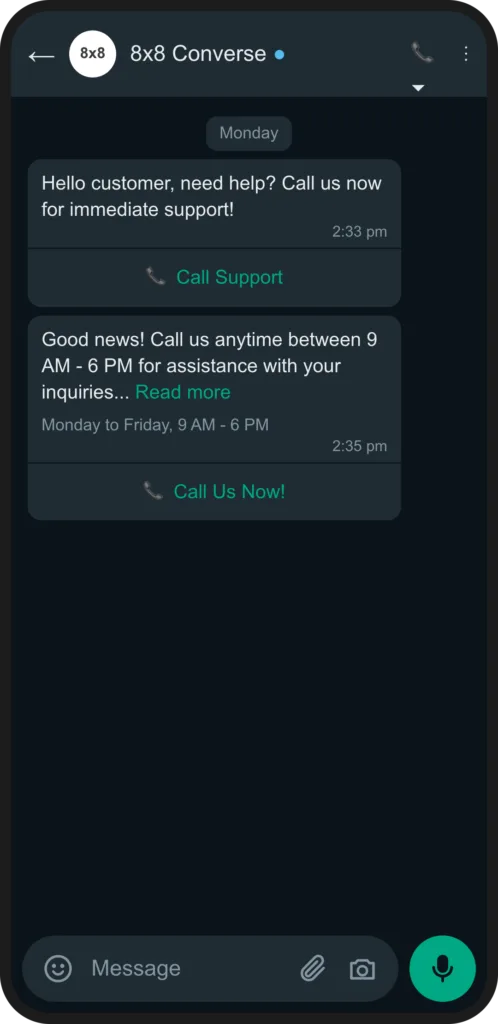
- 8×8 Converse: Give agents one workspace to pick up WhatsApp conversations, including escalated WhatsApp Business Calling, with full message history already visible, so support teams aren’t switching tools mid-conversation.
- WhatsApp Business Calling: Let customers call your business directly from the WhatsApp thread, or call them back with permission, without switching to a separate phone number. Not every BSP supports voice this way, so customers can escalate from chat to a call without ever leaving the WhatsApp conversation.
For businesses planning their WhatsApp implementation, understanding the total cost of messaging is equally important. Explore 8×8’s messaging-app pricing (the linked page shows Singapore pricing) to understand your available options for scaling customer communications.
If your business has its own development resources, the 8×8 CPaaS Developer Portal provides API references and integration guides to help connect 8×8 communication services and products with your existing applications and workflows.
Ready to explore WhatsApp Business API for your business? Talk to our experts to discuss your messaging requirements, integrations, and implementation needs.
Frequently Asked Questions
- What is the difference between WhatsApp Business API and WhatsApp Business App?The WhatsApp Business App is designed for businesses to manage conversations directly through an app, while the WhatsApp Business API is designed to connect WhatsApp with business systems, automation and customer-service workflows. The API is generally more suitable for businesses with larger teams, higher messaging volumes or integration requirements.
- Do I need a BSP in Australia to use WhatsApp Business API?Businesses typically work with a WhatsApp Business Solution Provider to access and implement the API, although the exact setup options can vary. A WhatsApp BSP for your Australian business can help with onboarding, infrastructure, integrations, and ongoing support.
- How long does WhatsApp API onboarding take?Onboarding can range from a relatively quick setup to several days or longer, depending on business verification, phone-number registration, template configuration and technical integrations.
- Can WhatsApp Business API integrate with a CRM?Yes. WhatsApp Business API can be integrated with CRM and customer-service platforms, allowing businesses to manage customer information and conversations as part of broader workflows. The specific integrations available depend on the provider.
- Can I use my existing WhatsApp Business number for the API?Potentially, but the process depends on how the number is currently configured and the onboarding method being used. Businesses should check the migration or registration requirements with their chosen provider before starting the setup.
- Can I send marketing messages through WhatsApp Business API?Yes, businesses can use WhatsApp for promotional communications where the relevant customer opt-in and WhatsApp requirements are met. Marketing messages should be clearly distinguishable from transactional or service communications and managed according to applicable consent and data-protection requirements.